7 Inspiring Examples of Image Sequence Scroll Animation
Explore real-world examples of image sequence scroll animations in action—from Apple and DJI to boutique agencies and 3D product launches.
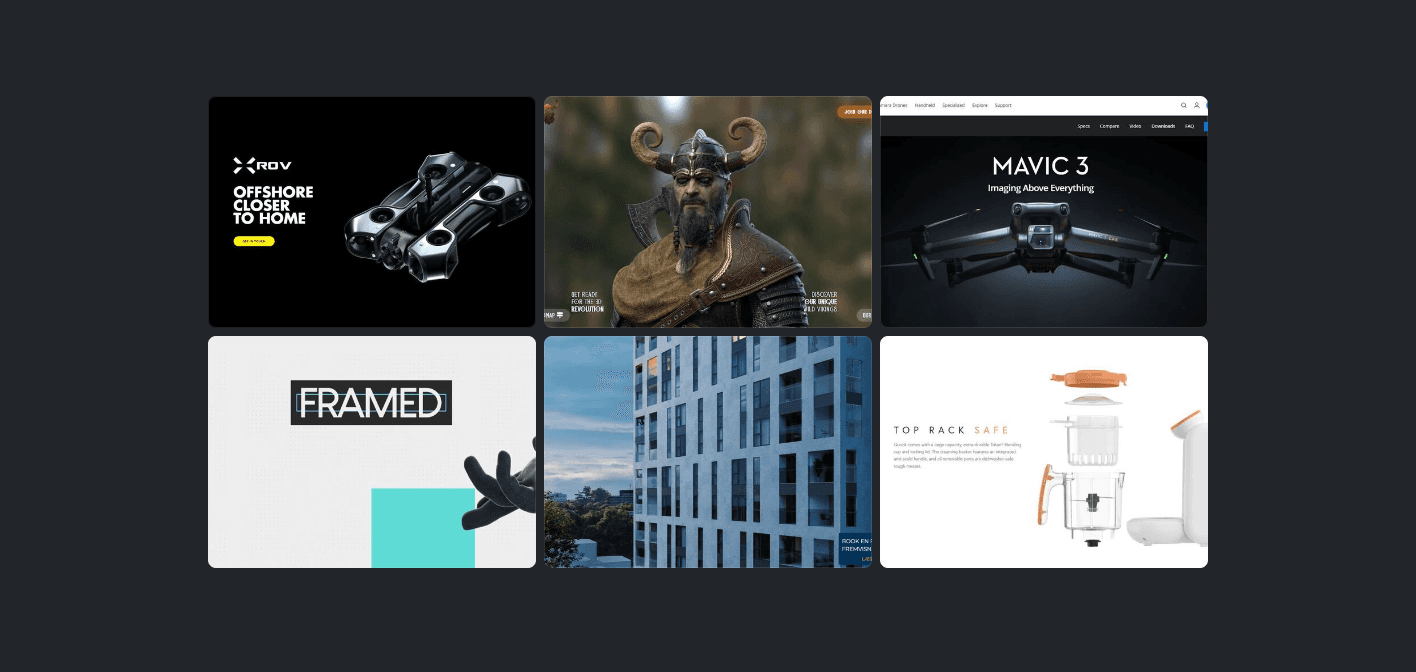
Image sequence scroll animation is one of the most effective techniques for transforming a standard website into a cinematic, tactile experience. Instead of forcing visitors to watch a passive autoplay video or click through endless image carousels, scroll-driven animations put the visitor directly in the driver's seat: scrolling down advances the sequence, scrolling up rewinds it, and pausing freezes the motion on the exact frame.
Whether you are unveiling an intricate hardware product, telling an interactive brand story, or creating a high-impact hero banner, image sequences let you deliver fluid 60 FPS visual storytelling without the erratic stutter of raw video scrubbing.
In this showcase, we explore 7 inspiring real-world examples of image sequence scroll animations across tech giants, creative agencies, and production websites—highlighting what makes each execution work and the lessons you can apply to your own projects.
Quick Comparison of Showcases
| # | Brand / Project | Core Technique | Key Highlight |
|---|---|---|---|
| 1 | WildVikings | 3D Character & Asset Scrubbing | Responsive frame delivery & Elementor sync |
| 2 | QuarkBaby | Interactive Modal Walkthrough | Exploded assembly on scroll |
| 3 | Framed Academy | Playful 2D/3D Hand Motion | Expressive tactile brand narrative |
| 4 | Roxanalytics | Dynamic Hero Cityscape | Camera fly-through transitioning into logo |
| 5 | SeaDronePro | Technical Hardware Disassembly | Internal component breakdown |
| 6 | DJI Mavic 3 | Cinematic Product Reveal | Dual-camera sensor & wing unfolding |
| 7 | Apple AirPods Pro | Precision Canvas Scrollytelling | The gold standard in minimalist tech reveals |
1. WildVikings
The WildVikings NFT website utilized a rendered 3D asset that rotates, zooms, and dynamically shifts perspective as the visitor scrolls down the page.
Why It Works
- Responsive Performance: Rather than pushing full-resolution desktop assets to mobile screens, the sequence dynamically serves device-optimized image sets, ensuring silky smooth playback regardless of screen size.
- Layered Text Sync: While the 3D sequence handles the heavy visual lifting via Scrollsequence, typography and UI callouts fade and translate in harmony using page-builder triggers.
[!TIP] Want to integrate interactive scroll sequences into your favorite page builder? Check out our step-by-step guide on Elementor and Scrollsequence integration.
2. QuarkBaby
QuarkBaby takes a uniquely customer-centric approach on their e-commerce product pages. Rather than overwhelming shoppers immediately on page load, they offer an "Interactive Walkthrough" button that launches a dedicated modal window.
Why It Works
- Guided Mechanical Assembly: As you scroll through the modal, the baby bottle disassembles and reassembles frame-by-frame, clearly demonstrating how each valve, nipple, and ring locks together.
- High Intent Dwell Time: By placing the scroll sequence inside a focused lightbox, customers inspect the craftsmanship without page distraction, drastically increasing conversion confidence.
3. Framed Academy
Creative studio and academy Framed.academy chose a distinct artistic route: instead of rotating a piece of hardware, they engineered an animated stylized hand that moves, gestures, and interacts with the layout as the user scrolls.
Why It Works
- Personality & Brand Alignment: The motion feels playful and quirky, instantly differentiating the agency from corporate competitors.
- Scroll as an Art Medium: It demonstrates that scroll-driven image sequences are not limited to 3D CAD models—hand-drawn illustrations, stop-motion clips, and stylized vectors work equally well.
4. Roxanalytics
Roxanalytics uses an image sequence scroll animation right in the above-the-fold hero section. As the visitor scrolls into the page, the camera smoothly sweeps backward through an aerial city skyline while UI elements and analytical callouts slide into place before transitioning seamlessly into their brand emblem.
Why It Works
- Instant Immersion: Visitors are hooked within their first scroll gesture.
- Seamless State Transitions: The transition from full-bleed 3D environment into crisp flat interface elements creates a memorable contrast that underscores the brand's data-driven capabilities.
5. SeaDronePro
The SeaDronePro XROV is an industrial-grade underwater inspection drone with intricate internal electronics, modular thrusters, and pressure-sealed housings. Explaining these specs in dry bullet points rarely conveys the engineering effort involved.
Why It Works
- Exploded View Architecture: As the visitor scrolls, the exterior shell floats away, exposing the high-torque thruster assembly, tether electronics, and watertight camera module.
- Pacing Controlled by the Buyer: Engineering leads can scrub slowly over the exact component they care about, zooming in on technical nuances at their own pace.
6. DJI Mavic 3
Drone pioneer DJI regularly employs scroll-controlled animation across their flagship launch pages. In this showcase for the Mavic 3, scroll gestures unfold the aerodynamic arms, rotate the dual-camera Hasselblad payload toward the viewer, and highlight the omnidirectional obstacle avoidance sensors.
Why It Works
- Cinematic Framing: Studio-grade rim lighting and dramatic camera orbits make the consumer drone feel like an aerospace marvel.
- Rhythm & Rest: Between dynamic sequence moves, the page pins the drone in place, giving visitors ample opportunity to absorb key performance metrics.
7. Apple AirPods Pro
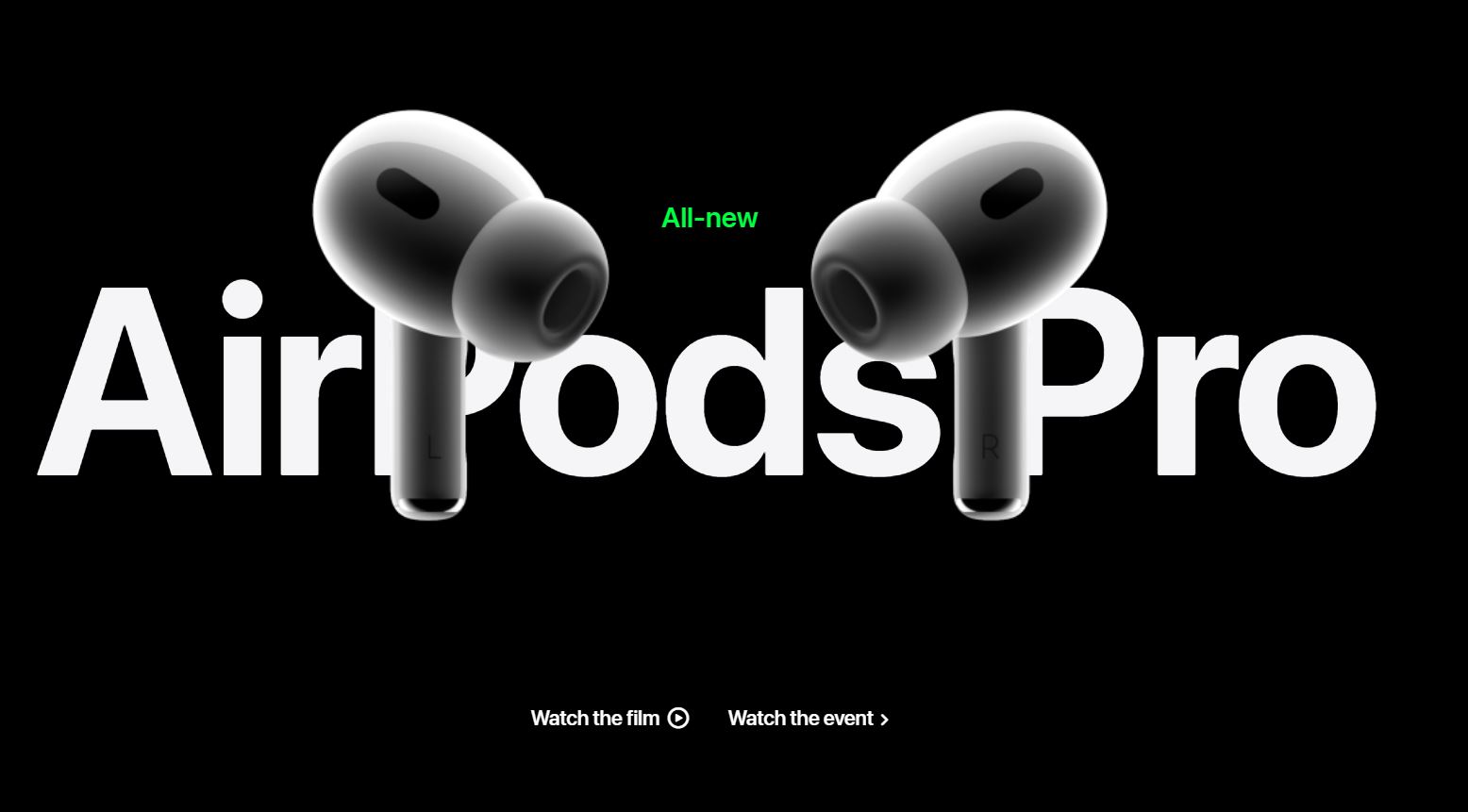
No list of scroll-driven animations would be complete without Apple. The tech giant popularized this interaction model worldwide with their iconic AirPods Pro and Mac Pro microsites.
Why It Works
- Pixel-Perfect Canvas Scrubbing: Rather than struggling with native
<video>jitter, Apple renders pre-optimized WebP/JPEG frames directly onto an HTML5<canvas>, achieving butter-smooth 60 FPS scrub rates across iPhones, iPads, and desktop Safari. - Exploded Acoustic Architecture: The ear tip, outward-facing microphone, H1 chip, and custom high-excursion driver peel apart along an invisible axis, visually proving why the audio quality is superior.
[!NOTE] Curious how Apple builds their canvas sequences? Read our comprehensive architectural breakdown in Scroll Image Animation: The Complete Guide.
Key Takeaways for Building Your Own Scroll Sequence
Analyzing these 7 diverse implementations reveals several clear patterns for success:
- Favor Image Sequences over Raw Video Elements: True video scrubbing (
video.currentTime) often drops frames or lags on mobile. Rendering optimized image frames to an HTML5<canvas>remains the industry gold standard for consistent 60 FPS fluidity. - Keep Frame Counts Lean: You don't need 500 frames for a compelling interaction. 60 to 120 frames at 30 fps typically provides plenty of movement while keeping payload sizes below 3–5 MB.
- Use WebP or Compressed JPEG: Aggressively compress your frame exports to preserve bandwidth without sacrificing visual crispness.
- Synchronize Supporting Text: The animation provides the visual anchor; ensure your text copy, specs, and CTAs appear at precise frame milestones to drive user comprehension.
Ready to Build Your Own Sequence?
Whether you're building inside WordPress using the Scrollsequence plugin or crafting custom React / Next.js web applications, scroll animations have never been more achievable.
- Explore the fundamentals in our Video Scroll in Webdesign: The Ultimate Guide.
- Learn the conversion pipeline in How to Convert Video to Images.
- Check out interactive examples and live implementations on our Examples page.
Read more
Video Scroll in Webdesign: The Ultimate Guide
Everything you need to know about video scroll animations in 2026: how they work, the 3 technical approaches, performance, SEO, and how Scrollsequence modernizes the workflow.

Scroll Image Animation: The Complete Guide (2026)
A comprehensive guide to scroll-driven image sequence animations: history, real-world examples, performance, SEO, and the best implementation methods across WordPress, GSAP, Motion, Anime.js, and Scrollsequence.

React Example
React Example